THE OPEN FILE FORMAT FOR USER INTERFACES
The interface,
finally a file.
.gui is an open file format for user interfaces. Text you can read, a file you can send, a design that stays a design:whoever, or whatever, made it.
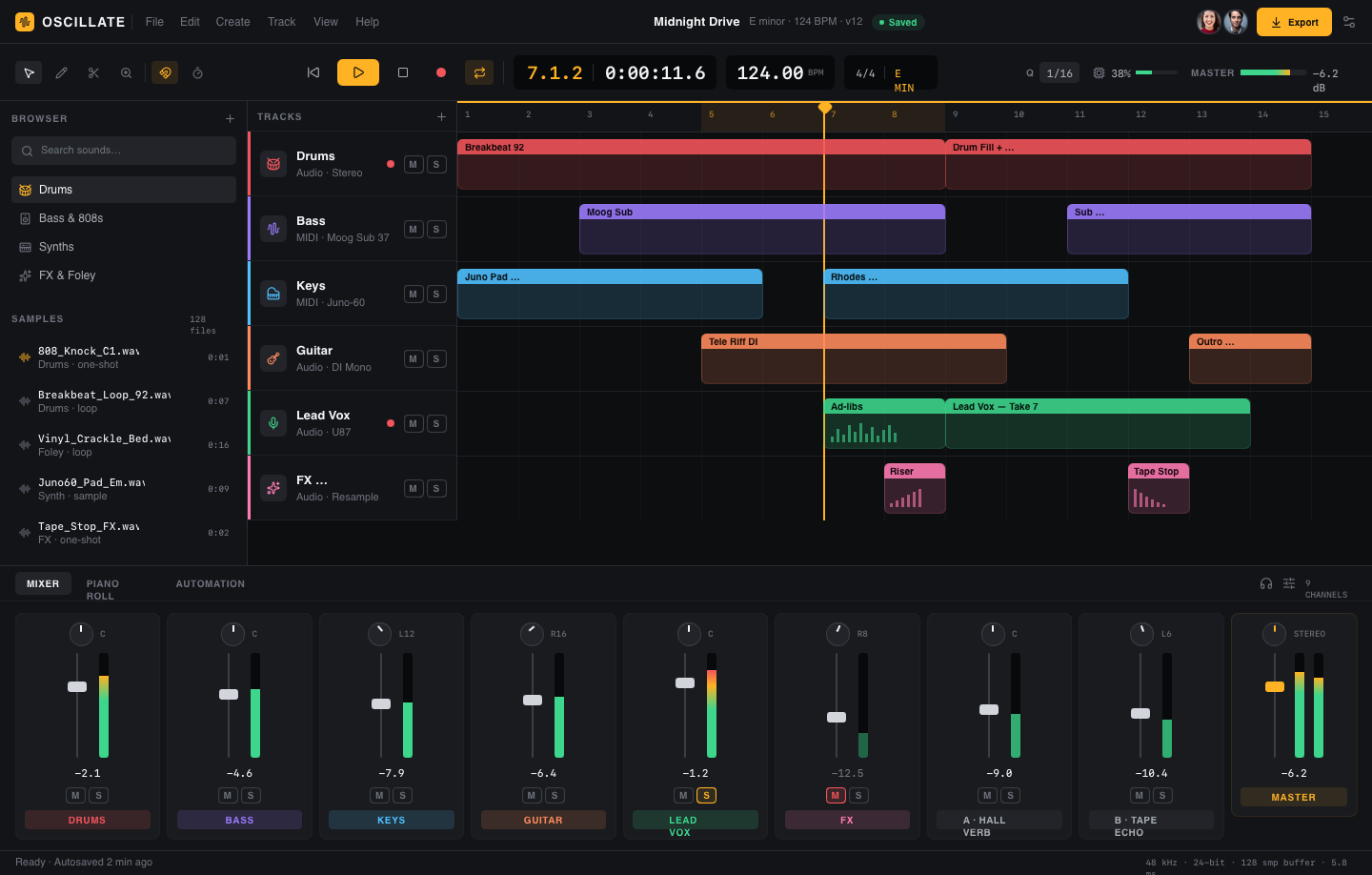
<gui version="0.2" name="Oscillate:Music Production">
  <tokens>
    <!-- surfaces -->
    <color name="bg"      value="#0D0E10" />
    <color name="surface" value="#131418" />
    <color name="well"    value="#08090B" />
    <!-- accents -->
    <color name="accent"  value="#FFB224" />
    <color name="green"   value="#3DD68C" />
    <!-- track colors -->
    <color name="tr-drums" value="#F2555A" />
    <color name="tr-bass"  value="#9D7BFF" />
    <color name="tr-keys"  value="#4FC1FF" />
    <number name="radius-md" value="8" />
  </tokens>

  <!-- ───────────── Title bar ───────────── -->
  <row role="top-navigation-bar" w="fill" h="46" fill="$surface" border-bottom="1 $hairline">
    <row w="20" h="20" radius="5" fill="$accent" align="middle-center">
      <img src="lucide/audio-waveform.svg" w="12" h="12" />
    </row>
    <text text-style="Brand" value="OSCILLATE" fill="$ink" letter-spacing="8%" />
  </row>

  <col role="sidebar" w="260" h="fill" fill="$surface" p="12" gap="12">
    <text text-style="Tiny" value="BROWSER" fill="$muted" />

    <instance component="comp-track-header" track-name="Drums" track-kind="Audio · Stereo"
      accent="$tr-drums" icon="lucide/drum.svg" />
    <instance component="comp-track-header" track-name="Bass" track-kind="MIDI · Moog Sub 37"
      accent="$tr-bass" icon="lucide/audio-waveform.svg" />
    <instance component="comp-track-header" track-name="Keys" track-kind="MIDI · Juno-60"
      accent="$tr-keys" icon="lucide/piano.svg" />
  </col>
</gui>
the same file:drag to skim between its markup and the pixels it renders. the way SVG made graphics text, .gui makes interfaces text.
Interfaces never got a format of their own.HTML is the web.Swift is a runtime.A mockup is a picture.Each one belongs to a platform none of them is just the design, ready to travel..gui is the first that is.
WHAT DOES GUI STAND FOR?
Everyone reads the same file through their own lens.
For designers, .gui preserves layout, hierarchy, spacing, and color as something visible and editable.For AI agents, .gui is a structured target they can write directly, not a screenshot or a pile of code.For developers, .gui is predictable grammar: parseable, diffable, validatable, and transformable.For platforms, .gui is one interface description that can travel across renderers and tools.
THE LOOP
The same file, tool to tool.
Ask an agent for a screen and it writes the file. Open it in a browser. Soon, drop it into Figma, nudge a color, send it back. Every tool reads and writes the one home.gui:the design moves as data, not as a fresh screenshot or rewrite at each step.
one shared file:read and written by every tool, not re-created at each step
ONE FILE IN THE MIDDLE
Written by anything. Rendered anywhere.
The .gui file sits in the middle. Any tool or agent can author it; any platform can render or translate it. Open on both sides:nothing locked coming in, nothing rewritten going out.
<rect role="button">
</col>
WHY TEXT, NOW
Pixels can't keep up. Text can.
An interface isn't timeless like a painting:it shifts with every OS, pattern, and framework. A picture can't follow that. A text file can, and so can the models working on it.
Change it by asking
Editing a .gui is editing text:precise and instant. No waiting for an agent to re-render a whole screen as a pixel-perfect image and hoping the rest survived.
No model to wait for
You're not stuck until the next image model ships. Hand an agent a few .gui examples and it matches your style today:no retraining, no fine-tune.
New frameworks, same file
When a platform ships a new look, a new pattern is a new .gui snippet:written down in an afternoon, not waited on through a retrained vision model.
Every file is design knowledge
A readable corpus of real interfaces:the craft once locked inside pixels, now text a model, or a teammate, can actually learn from.
THE TOOLCHAIN
Write it. Check it. Render it anywhere.
Your agent writes the file
gui setup installs the .gui skill into the coding agents you already use:it adds a skill, not an agent. The CLI itself lints, packs, previews. Zero AI inside the tool.
The engine keeps it honest
Parse, validate, render, lint, autofix, score:one deterministic package. A low score is still a valid file.
One script renders it
A CDN script and a gui-embed element render any .gui on any page. A Figma plugin to move files in and out of design tools is coming soon.
THE LIBRARY
The proof is in the files.
Real .gui files — every one is plain text you can read, preview, and download. Some are ambitious clones of complex, well-known interfaces (Spotify, Figma, Instagram and more). They're here to show the format can carry a serious, real-world design end to end — not to reproduce anyone's product.


HOW .GUI COMPARES · AS OF 2026
Where .gui fits, next to the formats you know
As of 2026, most teams still ship interfaces as one of four things: HTML, an SVG, a Figma file, or a flat screenshot. Each is great at one job and wrong for the others. The table below lines them up on the traits that matter when a design has to travel between a designer, a developer, and an AI agent in the same day.
| Format | What it is | Plain text? | Has a layout system? | AI can read & write it? | Renders to pixels? |
|---|---|---|---|---|---|
| .gui | A portable UI design file | Yes:readable XML | Yes:stacks, grids, tokens | Yes:by design | Yes:via the renderer |
| HTML | A web application runtime | Yes | Partial:needs CSS + a toolchain | Partial:verbose, framework-bound | Yes:in a browser |
| SVG | A vector graphics format | Yes | No:paths and shapes only | Partial:no UI semantics | Yes |
| Figma file | A design-tool document | No:binary API | Yes:inside Figma only | No:not text | Yes:in Figma |
| Screenshot | A flat raster image | No | No | No:needs vision guessing | It is pixels |
The pattern is the same one SVG followed for graphics: as of 2026, making interfaces text is what lets them move between tools without a rewrite at each step. Common questions → · Updated July 2026
Design, written down.
open format · deterministic toolchain · yours to keep